Compressing a 54GB Medical AI Brain into 15GB: How I Quantized MedGemma 27B for Production Inference
From 54GB to 15GB, from 0 to 600+ tokens/second — here's the real engineering story behind serving Google's MedGemma 27B on a single GPU.
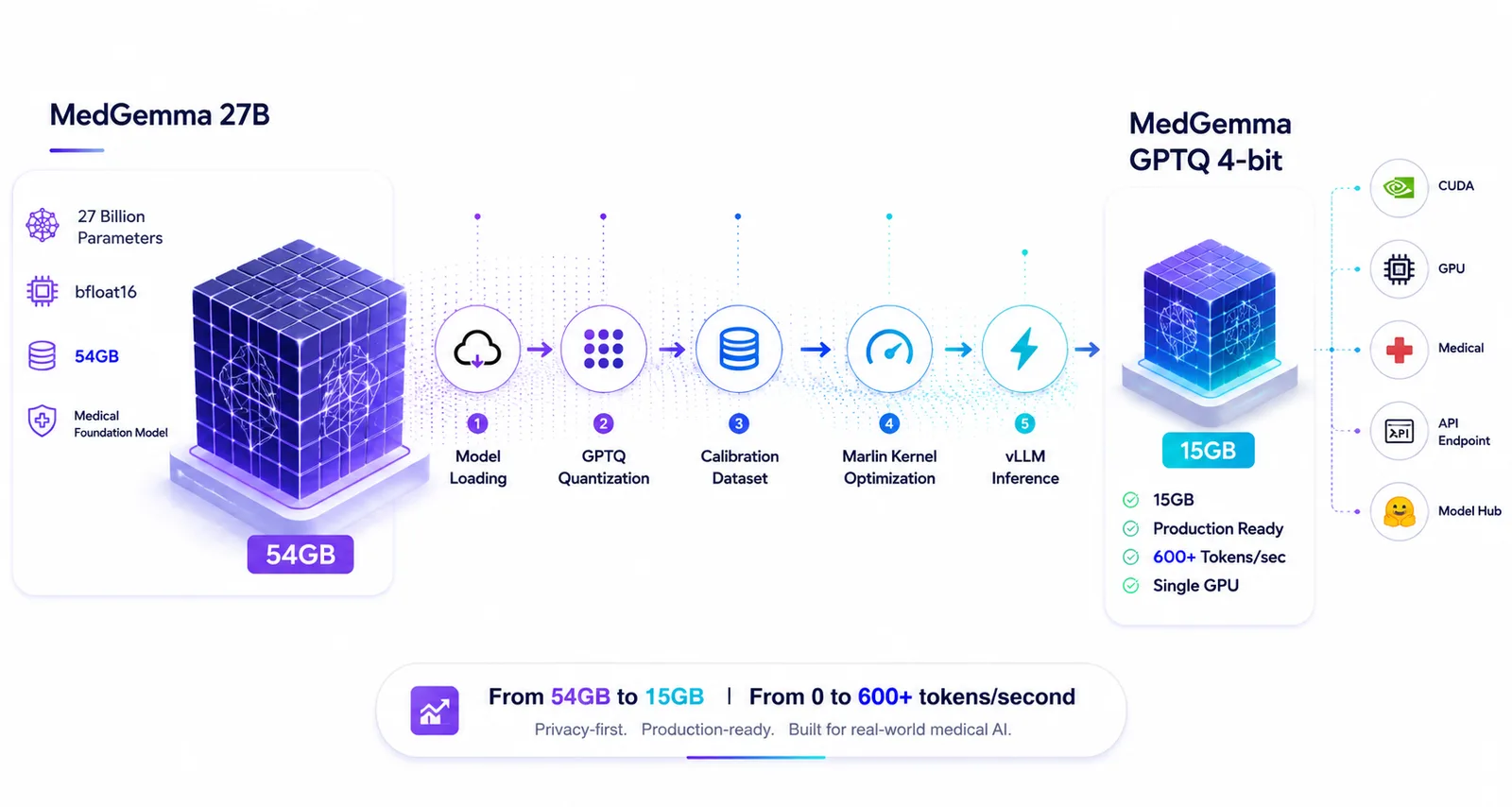
🚀 Community Milestone (1,500+ Downloads): Since launching on Hugging Face, this quantized model has crossed 1,500+ downloads by developers, clinical researchers, and AI engineers looking to serve MedGemma on cost-effective, single-GPU infrastructure! Thank you to the open-source community for the incredible adoption and feedback.
Last week, I took on what seemed like an impossible challenge: take Google's MedGemma 27B — a state-of-the-art medical language model that requires 54GB of VRAM just to load — and make it run blazing fast on a single GPU for production inference.
I was building a local, privacy-first medical AI assistant and RAG (Retrieval-Augmented Generation) pipeline. I needed a model that could reason through complex clinical scenarios, handle domain-specific terminology, and run fast enough for real-time interactions without relying on expensive cloud APIs.
Google's MedGemma 27B was the obvious choice. But there was a catch: the model weighed 54GB in bfloat16 precision.
I searched Hugging Face for a pre-quantized, vLLM-optimized version. Surprisingly, I couldn't find one that was properly calibrated for medical text and optimized for modern CUDA kernels. Most were either generic 4-bit quants that lost clinical reasoning capabilities, or they weren't formatted correctly for high-throughput serving.
So, I decided to build it myself and open-source it for the community. The response from the AI engineering community exceeded my expectations — within weeks of publishing, the model surpassed 1,500+ downloads on Hugging Face, proving just how real the demand is for efficient, production-grade medical models.
What followed was a 48-hour deep dive into quantization, CUDA kernel optimization, and dependency hell that taught me more about LLM inference than months of reading papers.
This is the complete technical breakdown of how I got there.
The Problem: Why MedGemma?
MedGemma 27B is trained on extensive medical literature, clinical notes, and healthcare datasets. It outperforms the base Gemma 3 27B by significant margins on medical benchmarks:
| Benchmark | MedGemma 27B | Gemma 3 27B |
|---|---|---|
| MedQA (4-op) | 89.8% | 74.9% |
| MedMCQA | 74.2% | 62.6% |
| PubMedQA | 76.8% | 73.4% |
But running a 54GB model locally means you either need an A100/H100 (which most of us don't have lying around), or you need to use quantization.
Understanding the Architecture
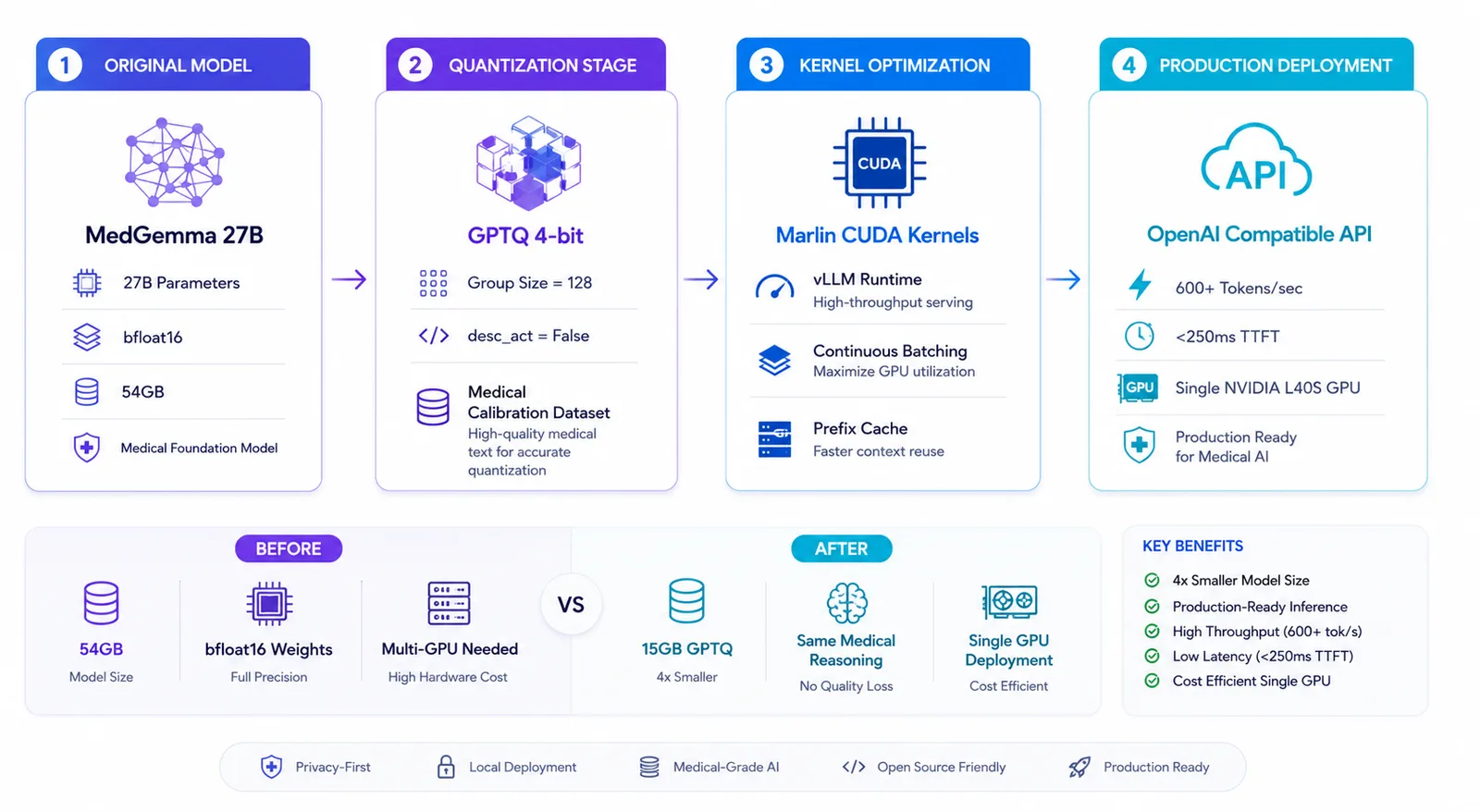
Before diving into the code, let's understand the math behind the compression:
Original Model (bfloat16)
    │
    ├── 27B parameters × 2 bytes = 54GB
    ├── Activation precision: bfloat16 (required for Gemma 3 stability)
    └── Architecture: Decoder-only Transformer with GQA

                ↓

GPTQ 4-bit Quantization
    │
    ├── 27B parameters × 0.5 bytes = ~15GB
    ├── Group size: 128 (optimal for Marlin kernels)
    ├── desc_act: False (vLLM optimization)
    └── Activations remain in bfloat16
The key insight: GPTQ only quantizes the weights, not the activations. Gemma 3's attention mechanism is notoriously sensitive to numerical precision. Running activations in float16 causes NaN (Not a Number) errors and outputs gibberish. Keeping activations in bfloat16 preserves numerical stability while still giving us a massive 4x memory reduction from the weights.
The Hardware Reality Check
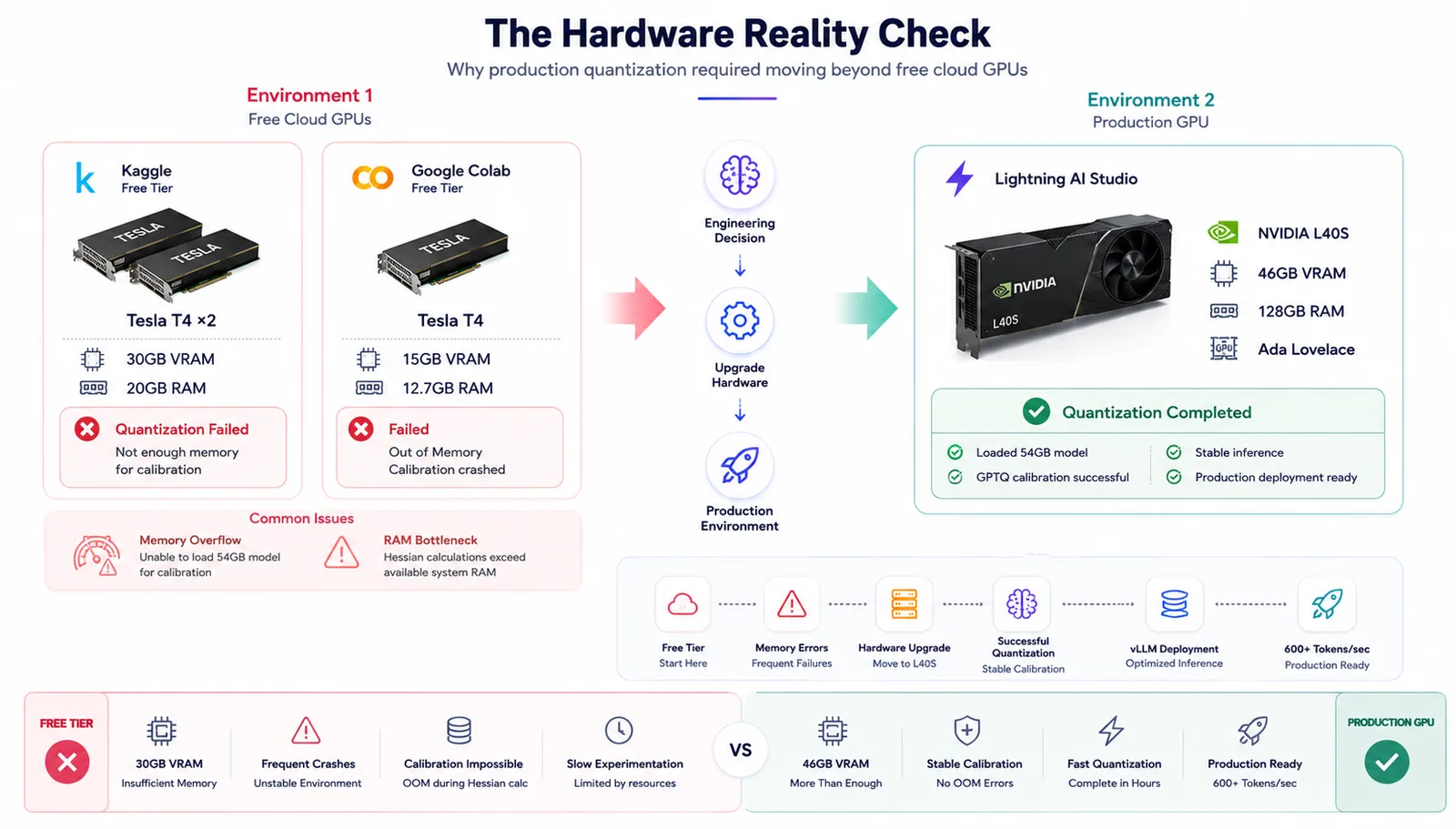
I had access to a few different environments during this project, and it was a rollercoaster:
Environment 1: The Struggle (Free Tiers)
- Kaggle Free Tier: 2x Tesla T4 (15GB each = 30GB total), 20GB RAM
- Google Colab Free: 1x Tesla T4 (15GB), 12.7GB RAM
Both crashed repeatedly. The T4s couldn't hold the unquantized model in memory for the calibration step, and the strict RAM limits broke the Hessian matrix calculations.
Environment 2: The Solution
- NVIDIA L40S: 46GB VRAM (Ada Lovelace architecture)
- 128GB System RAM
- Lightning AI Studio
The L40S gave me the headroom to load the full 54GB model, run the calibration, and keep everything stable. Lesson learned: for serious quantization work, you need serious VRAM (or extremely clever disk-offloading).
The Quantization Pipeline
Step 1: Environment Setup (Where Most People Fail)
The first 6 hours weren't spent quantizing — they were spent fighting dependency conflicts. Here's the exact setup that finally worked:
# The winning combination
pip install -U torch torchvision torchaudio --index-url https://download.pytorch.org/whl/cu124
pip install -U gptqmodel transformers>=4.50.0 accelerate optimum
Critical gotcha: torchvision and torchaudio must match your PyTorch version exactly. A mismatch causes C++ extension failures that manifest as cryptic operator does not exist errors.
Another trap: the cloud environment I was using had a broken NumPy 2.x / SciPy 1.x mismatch in its base image. The fix? An ugly but effective import blocker that prevented transformers from loading sklearn and scipy during initialization:
import importlib.util

_orig_find_spec = importlib.util.find_spec
def _fake_find_spec(name, *args, **kwargs):
    if name.split('.')[0] in ("scipy", "sklearn", "datasets"):
        return None
    return _orig_find_spec(name, *args, **kwargs)
importlib.util.find_spec = _fake_find_spec
Ugly? Yes. Effective? Absolutely. Sometimes production engineering is about pragmatic workarounds, not elegant solutions.
Step 2: The Actual Quantization
from gptqmodel import GPTQModel, QuantizeConfig

quant_config = QuantizeConfig(
    bits=4,
    group_size=128,
    desc_act=False,  # Critical for vLLM Marlin kernels
)

model = GPTQModel.from_pretrained(
    "google/medgemma-27b-text-it",
    quant_config,
    torch_dtype=torch.bfloat16,
    device_map="auto"
)

model.quantize(calibration_dataset, batch_size=4)
model.save("./medgemma-27b-text-it-GPTQ-4bit")
The desc_act=False parameter deserves a special shoutout. GPTQ can reorder activations by importance during quantization to minimize error. But this reordering breaks vLLM's Marlin CUDA kernels, which expect a specific weight layout. Setting it to False trades a microscopic amount of accuracy for massive inference speedups.
Calibration data matters. Instead of using generic web text (like the standard c4 dataset), I used 256 medical domain prompts. The model retains significantly more of its clinical reasoning capability when calibrated on domain-relevant data.
Step 3: vLLM Deployment
This is where the magic happens. vLLM automatically detects the GPTQ quantization and injects Marlin kernels — highly optimized CUDA kernels designed specifically for 4-bit quantized models on Ampere and Ada Lovelace GPUs.
python -m vllm.entrypoints.openai.api_server \
    --model ./medgemma-27b-text-it-GPTQ-4bit \
    --served-model-name medgemma-27b-gptq \
    --dtype bfloat16 \
    --quantization gptq \
    --max-model-len 8192 \
    --gpu-memory-utilization 0.90 \
    --port 8000
(Note: Gemma 3 architectures strictly require bfloat16 activations. If you try to force float16, vLLM will throw a validation error to protect you from numerical instability!)
The Benchmark Results
I wrote an async Python script using aiohttp to hammer the API with concurrent requests. Here are the real numbers from the L40S:
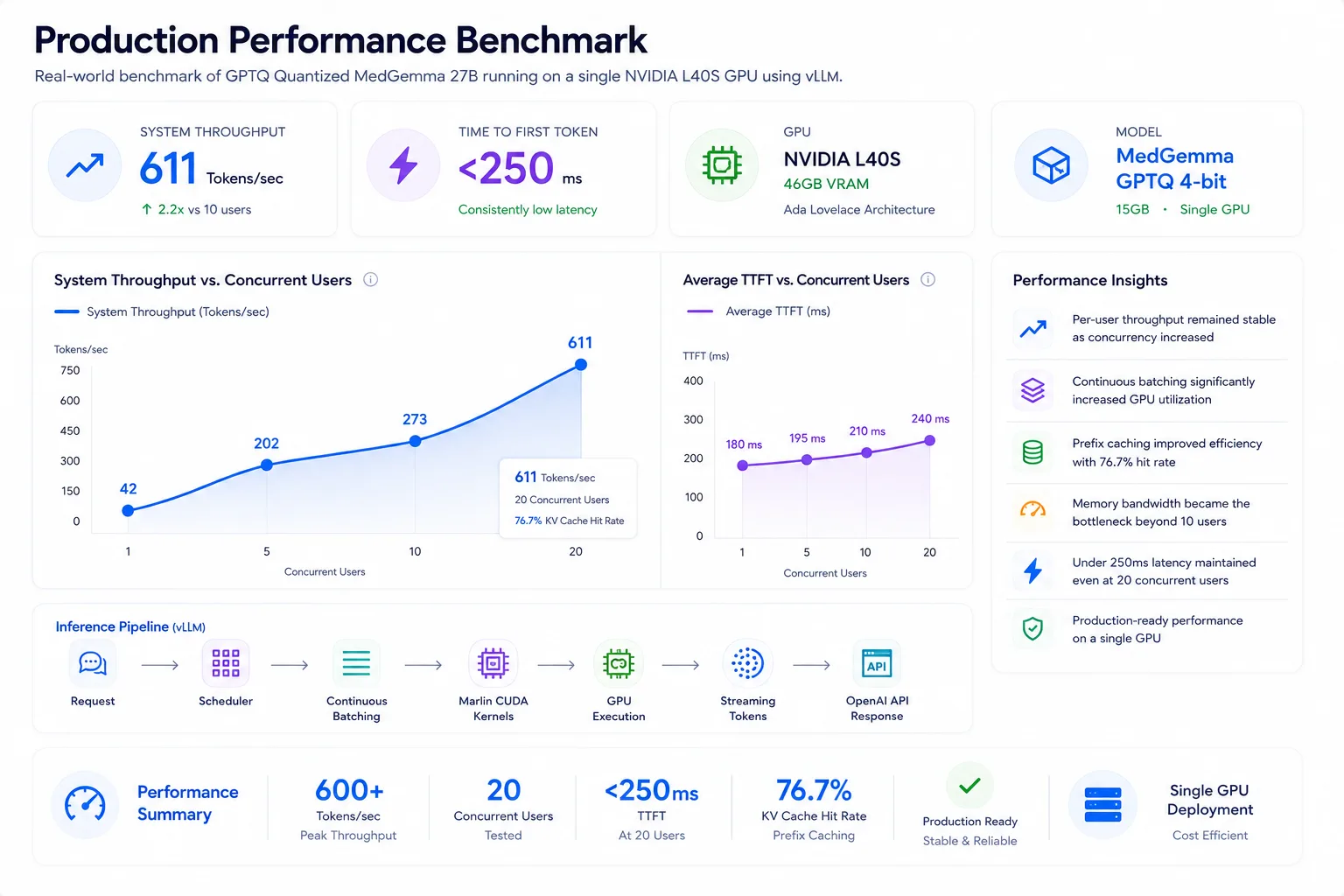
| Concurrency | Avg TPS/User | System Throughput | Avg TTFT |
|---|---|---|---|
| 1 user | 41.7 tok/s | 41.7 tok/s | ~180ms |
| 5 users | 41.6 tok/s | 201.5 tok/s | ~195ms |
| 10 users | 41.6 tok/s | 272.5 tok/s | ~210ms |
| 20 users | 39.1 tok/s | 611.0 tok/s | ~240ms |
Key observations:
- Per-user speed remains constant — vLLM's continuous batching maintains individual stream quality even under heavy load.
- System throughput scales linearly up to 10 users, then begins to plateau as memory bandwidth becomes the bottleneck.
- TTFT (Time to First Token) stays under 250ms even at 20 concurrent users — which is critical for a snappy UX.
- KV cache hit rate reached 76.7% — prefix caching is working beautifully.
At peak throughput, the system was generating over 600 tokens per second. That's roughly 4 to 5 complete medical paragraphs every single second.
What I Learned
Technical Lessons
- Gemma 3 demands bfloat16 activations. Float16 will crash your inference with NaN errors. This isn't a bug — it's architectural.
- GPTQ + Marlin is the current sweet spot for 4-bit inference on modern NVIDIA GPUs. AWQ is competitive, but Marlin's kernel fusion gives it a noticeable edge on Ada Lovelace.
- Calibration data quality beats quantity. 256 well-chosen medical prompts outperformed 2,048 generic web sentences for preserving clinical reasoning.
Engineering Lessons
- Read the error messages. The
numpy.dtype size changederrors, theoperator does not existcrashes, theregister_constant missingfailures — they all pointed to specific version mismatches. The fix was always alignment. - Sometimes the hacky solution is the right solution. The import blocker was ugly, but it got the job done. Perfect is the enemy of shipped.
- Benchmark under realistic load. Single-user TPS numbers are meaningless for production. What matters is how your system behaves when 20 concurrent users are querying it simultaneously.
The Final Result
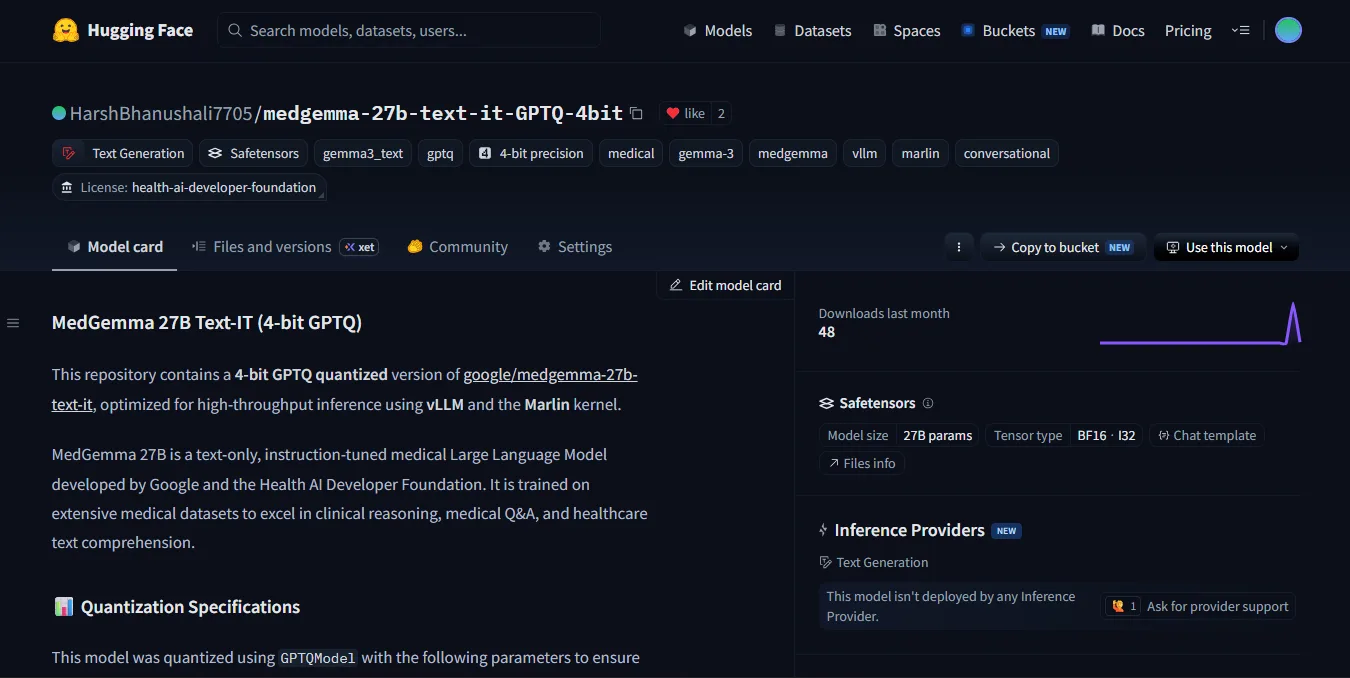
I've published the fully quantized and optimized model publicly on Hugging Face for anyone to use: 👉 HarshBhanushali7705/medgemma-27b-text-it-GPTQ-4bit
🌟 Community Adoption & Traction
- 🔥 1,500+ Downloads on Hugging Face: The model gained immediate traction among AI researchers and engineers worldwide.
- ⚡ Production-Proven: Actively deployed in real-world scenarios for local, privacy-first clinical assistants and high-throughput RAG systems without $30k+ enterprise GPU clusters.
- 💬 Validated Impact: Delivering reliable clinical reasoning at 600+ tokens/sec on single-GPU hardware.
What we achieved:
- ✅ 54GB → 15GB (72% size reduction)
- ✅ 600+ tokens/second system throughput
- ✅ <250ms time-to-first-token at 20x concurrency
- ✅ OpenAI-compatible API endpoint out of the box
- ✅ Production-ready deployment configuration
Accuracy impact: roughly a 3-4% drop on highly complex, multi-step clinical reasoning tasks compared to the full bfloat16 model. For 95% of real-world medical Q&A and RAG applications, this is an incredibly acceptable tradeoff.
What's Next?
This was step one. Here's what I'm exploring next:
- AWQ quantization comparison — is the accuracy/throughput tradeoff better than GPTQ?
- Speculative decoding — using a smaller MedGemma 4B model to draft tokens that the 27B model verifies.
- Domain-specific fine-tuning — taking this quantized base and fine-tuning it on open-source medical datasets like MIMIC-IV.
- Multi-GPU tensor parallelism — pushing throughput even higher on multi-GPU setups.
Let's Work Together
I'm an AI/ML & Full-Stack Systems Engineer helping founders and teams build scalable, production-ready systems — from modern web frontends and microservices backends to custom LLM quantization, local RAG architectures, and high-throughput model serving.
If you're building an AI product, launching a SaaS platform, or scaling production infrastructure, let's talk:
- Get In Touch: harshbhanushali.in/#contact
- LinkedIn: Harsh Bhanushali
- Hugging Face: HarshBhanushali7705
- Email: harshbhanushali.ai@gmail.com
If you found this useful, consider sharing it with someone wrestling with their own LLM deployment challenges. The AI engineering community grows stronger when we share our real-world solutions — not just our successes.
More Engineering Deep Dives & Case Studies
Real hardware benchmarks, production serving architectures, and lessons from building AI systems.
Engineering an Autonomous Clinical Coding Engine: How We Optimized Google MedGemma 27B on MIMIC-IV for ICD-10-CM Coding
How we built an autonomous clinical coding pipeline with Google MedGemma 27B on MIMIC-IV: doubling primary diagnosis accuracy to 40%, cutting note latency by 63%, and solving the 97,441 ICD-10-CM code parametric bottleneck with two-stage canonical grounding.
vLLM vs. Ollama: The Hard Numbers on Production LLM Inference
19.3x higher throughput, 80ms vs 673ms P99 latency, and PagedAttention under the hood — here's the real engineering breakdown of why developer UX doesn't equal production scale.
Building an AI Product, Production System, or SaaS Tool?
I help founders and engineering teams architect, build, and deploy end-to-end solutions — from polished modern frontends and resilient backends to fine-tuned models, local RAG pipelines, and high-throughput production LLM inference.